Last week, I upgraded my home server from Ubuntu 24.04 LTS (Long Term Support) to Ubuntu 26.04 LTS. I expected smooth sailing, but you and I should know not to expect that, especially if there’s a blog post coming from it.
As soon as I started my Kubernetes cluster, services were failing to start left and right. Cloudnative-pg cluster pods were stuck crashing and restarting forever. Initially, I thought it was some kind of bug in Longhorn (the distributed storage I use for Kubernetes) because I was getting errors when reading/writing data saying “Remote I/O Error”, but the Postgres error was far more impactful.
The postgres pod, managed by cloudnative-pg, was running, but would give the following unhelpful logs. The logs effectively showed this:
| |
These logs were difficult to search the web for a root cause. So I kept investigating other options.
Manual fix
Due to messages elsewhere in the logs suggesting data corruption, I assumed cloudnative-pg was aggressively restarting the pod before it could recover. I manually ran Postgres to let it recover. Using nerdctl, a command-line interface for containerd similar to Docker’s, I ran:
| |
Then I started the Kubernetes Pod, and it was able to run and serve traffic for some time. I couldn’t explain why at the time—a mystery that the AppArmor investigation later in this post would help clarify.
Stuck in Postgres Auth
| |
dmesg
Time to look elsewhere. Dmesg was a good tool to check next. It captures the kernel-level logs and gave me a number of AppArmor failures.
| |
These logs indicate that AppArmor is blocking PostgreSQL from sending internal inter-process signals (SIGUSR1 and SIGURG) to other PostgreSQL processes running inside the same containerd-managed container. Because PostgreSQL relies heavily on signals for internal communication, this blockage can cause database locks, replication issues, or checkpoints to hang.
What this error message shows is that process ID (PID) 247075, which is a postgres process, tried to signal another postgres process and was denied.
What’s going on with AppArmor
Passing the Z argument to ps with ps afxuZ, gives us each PID’s AppArmor loaded profile:
| |
Each postgres process is running in the profile cri-containerd.apparmor.d//&unconfined. The //& signifies it’s a stacked profile. The process started out as cri-containerd.apparmor.d, then tried to transition to unconfined. The error shows that Postgres is trying to send a signal to another process. Even though it tried to transition to unconfined, AppArmor still enforces the AppArmor policy for signals from cri-containerd.apparmor.d instead of unconfined.
Looking at the original error, the source process should be cri-containerd.apparmor.d//&unconfined and the destination process is also a cri-containerd.apparmor.d//&unconfined process. According to the container policy from v2.2.1 (which is the latest in Ubuntu 24.04) and in v2.2.2 (latest in Ubuntu 26.04), they both should have the ability to send and receive from the same container:
| |
At this point, I couldn’t reconcile two issues: why did this change break after upgrading to Ubuntu 26.04, and why does the source profile show cri-containerd.apparmor.d instead of cri-containerd.apparmor.d//&unconfined?
At this time, I had filed an issue against cloudnative-pg thinking it was limited to Postgres. Their doc bot gave me some suggestions including disabling AppArmor, which I did not want to do globally.
Digging into the Kernel
| |
First, I want to know why the error message source profile showed cri-containerd.apparmor.d instead of cri-containerd.apparmor.d//&unconfined. This would tell me whether the processes are genuinely in different AppArmor profiles or if this is just an artifact of the error log entry.
GLM-5.2 claimed that I had stumbled upon a “notoriously confusing quirk in how AppArmor logs audit entries”. That seemed suspect, so I checked out the apparmor source code and the Linux kernel and asked it to confirm whether that’s true or not based on the source code.
Which then lead me to the claim being probable:
Subject processes (what your postgres process is):
- Use
profile->base.hnamewhich is a simple name - No profile stack information logged
- Shows: cri-containerd.apparmor.d Target/peer processes:
- Use full stacked profile formatting with aa_label_snxprint()
- Includes “//&” separator for each stack layer
- Shows:
cri-containerd.apparmor.d//&unconfined(full stack) Key code paths:
| |
Why did this break in Ubuntu 26.04
I had a few theories on what could have changed: containerd, Linux kernel, K3s (Rancher’s lightweight Kubernetes distribution), or cloudnative-pg. I had not upgraded anything in Kubernetes, so that left containerd and the Linux kernel.
Looking at the containerd container policy file diff between 2.2.1 and 2.2.2, I see no material changes to the profile that could affect it. Nothing was added or removed in the policy.
Investigating kernel changes
Could it be yet another Linux kernel change? To answer this question, I tasked GLM-4.7-Flash to look through all relevant-looking commits and try to find a likely change.
It claimed commit 9afdc6abb looked suspect as it was changing from a list of rules to a vector rules. The commit didn’t appear obviously broken at first glance. Changing types could cause problems, but it seems to conflict with Linus Torvalds’ famous rant about not breaking user space if that is the cause.
The LLM suggested that the containerd policy was actually wrong and should include
| |
Then I discovered this containerd issue which aligned with the proposed fix above. I missed this issue in my initial issue investigation.
Workarounds
Disable AppArmor for all containerd
I’m not happy about this suggestion, but for clusters where the impact is wider than just a few containers, it might be better to just disable AppArmor entirely.
In my case, I’m running Kubernetes through Rancher-deployed k3s, which means this document applies. The document suggests extending the config using {{ template "base" . }}, but that resulted in a TOML (Tom’s Obvious, Minimal Language) validation error for me, so I ended up with this:
| |
Then my cluster object gets updated to deploy the file to each node:
| |
Only for Postgres
Since my impact was predominantly limited to Postgres instances, instead of globally disabling, I updated the cluster resource to disable AppArmor on just those containers
| |
Remote I/O Error
With Postgres sorted out, a separate, unrelated issue from the upgrade remained: some Kubernetes pods were reporting an error Remote I/O Error when reading or writing to the persistent volumes mounted into the application. Only some containers were having this issue, but it was very noticeable when it did happen since the application would break and CPU/Memory usage would climb significantly:
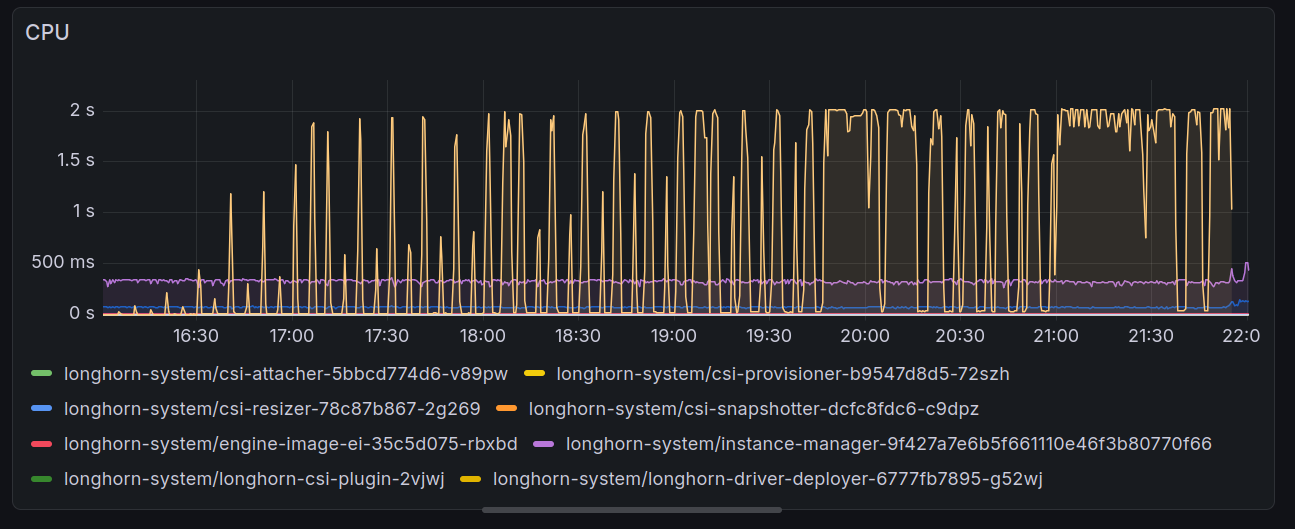
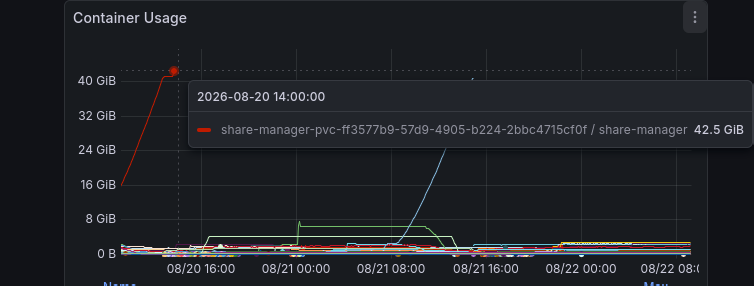
This issue appeared after I upgraded Longhorn to 1.11.x in the hopes that it would fix my Postgres issue, but no such luck.
A GitHub issue was already opened.
I was able to workaround the issue by restoring my volumes from backup and switching from ReadWriteMany to ReadWriteOnce. ReadWriteMany was a more complicated data path and apparently had some bugs in it.
Conclusion
I didn’t expect that upgrading from one LTS to an LTS would cause my Postgres databases to fail to start, but Ubuntu 26.04 brought in a new kernel version that surfaced a latent incompatibility between containerd’s AppArmor template and AppArmor’s stacking behavior.
The hardest part was diagnosis: random remote I/O errors from some Kubernetes services, Kubernetes having both seccomp profiles and AppArmor profiles hidden as annotations, and AppArmor errors that were misdirecting.
I didn’t discover any new Linux or Longhorn bugs. They were already filed, but in this post I showed my diagnostic strategy to investigate the issue and confirm the bug was the same.
I truly seem to be cursed with computers to find weird bugs.