As I switch from GitHub to Forgejo for my various project repositories, I find myself looking for a way to securely deploy new services into my Kubernetes cluster without having to keep updating Kubernetes auth tokens and storing them as a workflow secret.
GitHub Actions and, as of Forgejo v15, Forgejo Actions also supports providing temporary JWT tokens to workflow steps that securely state what repository and other commits details a given build is for. When a workflow is running, it can pass it to Kubernetes and other supported services and authenticate as a secure client with all the identity information of that repository and workflow. This is called OpenID Connect or OIDC.
This is super powerful because can federate identity and minimize the number of secrets required–great the next time a widely used workflow step gets compromised and steps all your secrets. Having fewer secrets helps.
In this post, I’m going to show how I configured Nix, Kubernetes, and Forgejo to securely update a deployment.
As of v1.30, Kubernetes launched a feature called Structured Authentication which allows a cluster owner to configure one or more OpenID Connect
kube-apiserver + Nix
First thing I need to do is tell kube-apiserver to listen to the OIDC tokens provided by Forgejo. Note, this does not actually give any permissions to any workflows yet. It just means that the JWT tokens will be decoded, validated, and matched against any ClusterRoles or Roles.
I’m using Nix, so I create this file in {nixosrepo}/parts/k8s/auth.yaml
 1
 2
 3
 4
 5
 6
 7
 8
 9
10
11
12
| apiVersion: apiserver.config.k8s.io/v1beta1
kind: AuthenticationConfiguration
jwt:
- issuer:
url: https://git.technowizardry.net/api/actions
audiences:
- forgejo
audienceMatchPolicy: MatchAny
claimMappings:
username:
claim: sub
prefix: "forgejo:"
|
The claimMapping section states that the sub attribute in the JWT token will be prefixed with forgejo: and matched against Roles. Forgejo will generate a sub attribute that looks like: "sub": "repo:user1/testing:ref:refs/heads/master".
The next step is to tell Kubernetes to actually use it. In my {nixrepo}/parts/kubernetes.nix, I add the following property:
 1
 2
 3
 4
 5
 6
 7
 8
 9
10
11
12
13
| {
config,
lib,
pkgs,
...
}:
{
services.kubernetes = {
apiserver = {
extraOpts = "--etcd-prefix=/registry --service-account-lookup=true --anonymous-auth=false --service-node-port-range=30000-32767 --authentication-config=${./k8s/auth.yaml}";
};
};
}
|
After a nixos-rebuild switch. Kubernetes is now ready to receive my JWT tokens
Kubernetes RBAC
Kubernetes clients don’t have any permissions until they have a RoleBinding and a Role associated with them.
My use case is to update a Deployment every time I push an update to this blog, so I create a Role that only has permissions in the given namespace.
 1
 2
 3
 4
 5
 6
 7
 8
 9
10
11
12
13
14
15
16
17
18
19
20
| apiVersion: rbac.authorization.k8s.io/v1
kind: Role
metadata:
name: blog-update
namespace: technowizardry
rules:
- apiGroups:
- apps
resources:
- deployments
# Only allow a specific deployment, not all deployments in the namespace
resourceNames:
- my-resource-name
verbs:
- update
- list
- watch
- patch
- get
- create
|
The RoleBinding (or ClusterRoleBinding) grants the above permission to the OIDC user.
 1
 2
 3
 4
 5
 6
 7
 8
 9
10
11
12
| apiVersion: rbac.authorization.k8s.io/v1
kind: RoleBinding
metadata:
name: forgejo:main-workflow
subjects:
- kind: User
apiGroup: rbac.authorization.k8s.io
name: forgejo:repo:adam/technowizardry.net:ref:refs/heads/main
roleRef:
apiGroup: rbac.authorization.k8s.io
kind: Role
name: blog-update
|
Forgejo Workflow
Now it’s time to update the workflow. Kubectl needs a few different configuration options to be able to connect: the CA cert and the endpoint. I defined a basic kubeconfig file which contained the following contents and saved it as a variable under my Forgejo user settings -> Actions -> Variables (/user/settings/actions/variables). This makes it available to all repositories owned by my user.
 1
 2
 3
 4
 5
 6
 7
 8
 9
10
11
12
13
14
15
16
| apiVersion: v1
kind: Config
clusters:
- cluster:
api-version: v1
certificate-authority-data: [Base64-encoded CA Cert]
server: "https://[API SERVER Endpoint]:6443"
name: "local"
contexts:
- context:
cluster: local
user: oidc
name: oidc
current-context: "oidc"
|
Then in repositories that need to connect to Kubernetes, I make a few changes
 1
 2
 3
 4
 5
 6
 7
 8
 9
10
11
12
13
14
15
16
17
18
19
20
21
22
23
24
25
26
27
28
29
30
31
32
33
34
35
36
37
38
39
40
41
42
43
44
| env
SHOULD_PUSH: ${{ github.event_name == 'push' && github.ref == 'refs/heads/master' }}
jobs:
build:
# Required for Forgejo
enable-openid-connect: true
runs-on: ubuntu-latest
permissions:
contents: read
packages: write
# Required for GitHub Actions
id-token: write
steps:
# Checkout, setup, build steps ellided
# The docker/build-push-action is called build-and-push
- name: Setup kubectl
if: ${{ env.SHOULD_PUSH }}
uses: https://github.com/azure/setup-kubectl@829323503d1be3d00ca8346e5391ca0b07a9ab0d # v5.1.0
with:
version: 'v1.34.0'
- name: Authenticate with Kubernetes
if: ${{ env.SHOULD_PUSH }}
run: |
set -euo pipefail
mkdir -p ~/.kube
echo "${{ vars.KUBERNETES_CONFIG }}" > ~/.kube/config
chmod 600 ~/.kube/config
export TOKEN=$(curl -sSL -X GET "$ACTIONS_ID_TOKEN_REQUEST_URL&audience=forgejo" \
-H "Authorization: Bearer $ACTIONS_ID_TOKEN_REQUEST_TOKEN" | jq -r '.value')
kubectl config set-credentials oidc --token=$TOKEN
- name: Deploy to Kubernetes
if: ${{ env.SHOULD_PUSH }}
env:
IMAGE_DIGEST: ${{ steps.build-and-push.outputs.digest }}
IMAGE_NAME: ${{ env.IMAGE_NAME }}
run: |
set -euox pipefail
kubectl set image deployment/{deployment} -n {namespace} blog=${{ env.REGISTRY }}/${IMAGE_NAME}@${IMAGE_DIGEST}
kubectl rollout status deployment/{deployment} -n {namespace} --timeout=120s
|
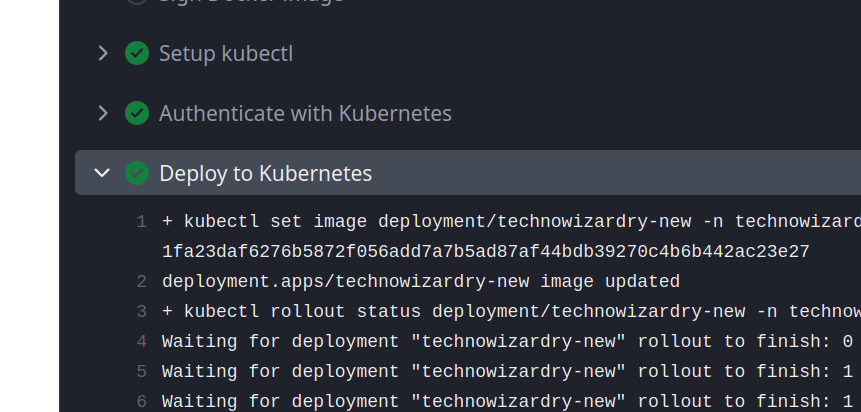
Then after a commit, I successfully deployed my service:
Supporting other branches
For some repositories, I want to give read-only access to the non-main branch. This helps me perform diffs in pull requests. This can be easily done with Kubernetes OIDC. Forgejo expose several other claim properties, including "repository": "user1/testing". OIDC tokens supports a user identity being part of a group. We’ll use that to give an actions run both a username that looks like forgejo:rep:user1/testing:refs:ref/heads/main and a group of forgejo:repo:user1/test.
 1
 2
 3
 4
 5
 6
 7
 8
 9
10
11
12
13
14
| apiVersion: apiserver.config.k8s.io/v1beta1
kind: AuthenticationConfiguration
jwt:
- issuer:
url: https://git.technowizardry.net/api/actions
audiences:
- forgejo
audienceMatchPolicy: MatchAny
claimMappings:
username:
claim: sub
prefix: "forgejo:"
groups:
expression: '"forgejo:repo:" + claims.repository'
|
Then the Kubernetes RoleBinding/ClusterRoleBinding can bind to the group and grant other branches only read-only access:
 1
 2
 3
 4
 5
 6
 7
 8
 9
10
11
12
| apiVersion: rbac.authorization.k8s.io/v1
kind: ClusterRoleBinding
metadata:
name: forgejo:readonly-for-other-branches
roleRef:
apiGroup: rbac.authorization.k8s.io
kind: ClusterRole
name: forgejo:readonly-role
subjects:
- apiGroup: rbac.authorization.k8s.io
kind: Group
name: forgejo:repo:user1/testing
|
References
Comments
To give feedback, send an email to adam [at] this website url.
Donate
If you've found these posts helpful and would like to support this work directly, your contribution would be appreciated and enable me to dedicate more time to creating future posts. Thank you for joining me!