Blogging on the Fediverse with ActivityPub

This article is part of the ActivityPub on Hugo series.

    Previously, if you wanted to subscribe to changes from this blog, you’d have to subscribe to the RSS feed, but as of today you can also subscribe to it in your preferred Fediverse client, like Mastodon. Note this is considered Beta quality. If you have any issues, let me know.

    What is the Fediverse? It’s a protocol for federated (meaning many independently operated) social networks, kind of like email. Under the hood, it uses a protocol called ActivityPub to define the interactions between different servers.

    There’s a number of big implementations of this, like Mastodon, that I could have used. However, I wanted to see if it was possible to integrate directly into my static website generator, Hugo and generate all the content directly out of the posts I already write without having to maintain another program and expose another domain name for people to remember (e.g. blog@mastodon.technowizardry.net.)

    This post walks through the work I did to make this work.

    What is ActivityPub?

    ActivityPub is an open standard protocol designed to enable decentralized social networking across different platforms and services. Published by the W3C organization, the same org that publishes the HTML standard, it allows users to maintain their online identities and connections while moving between different websites, apps, and services without losing access to their content or network.

    By defining an interoperable protocol, different software, like Mastodon, Lemmy, Pleroma can all subscribe and publish notes to different instances and software. The federation part means that you can subscribe to notes on a different server. My goal is to have readers be able to subscribe to posts in Mastodon and eventually be able to like and even comment on them.

    The WebFinger

    The first thing that happens when you follow somebody else is your software issues a “webfinger” request (spec). The client will GET https://www.technowizardry.net/.well-known/webfinger?resource=acct:blog@technowizardry.net. The response tells clients that I do support ActivityPub and the response looks like:

     1
     2
     3
     4
     5
     6
     7
     8
     9
    10
    11
    12
    13
    14
    
    {
      "subject": "acct:blog@technowizardry.net",
      "aliases": [
        "https://www.technowizardry.net/",
        "https://www.technowizardry.net/author/adam"
      ],
      "links": [
        {
          "rel": "self",
          "type": "application/activity+json",
          "href": "https://www.technowizardry.net/author/adam"
        }
      ]
    }
    

    To generate this with Hugo, create a file layouts/index.webfinger.ajson:

     1
     2
     3
     4
     5
     6
     7
     8
     9
    10
    11
    12
    13
    14
    
    {  
      "subject": "acct:blog@{{ strings.TrimRight "/" (replace $.Site.BaseURL "https://" "") }}",
      "aliases": [
        "{{ $.Site.BaseURL}}",
        "{{ $.Site.BaseURL }}author/adam"
      ],
      "links": [
        {
          "rel": "self",
          "type": "application/activity+json",
          "href": "{{ $.Site.BaseURL }}author/adam"
        }
      ]
    }
    

    The subject needs to match the value passed by the client in the /webfinger?resource=acct:blog@technowizardry.net. Since I only support a single account, I can hard-code the value. The links array will tell clients where to find my user details. This is critical for ActivityPub.

    Next we need to tell Hugo to generate this file (set in config.yaml). Note that I’m going to generate the files with an .ajson extension to distinguish between this and the HTML outputs. More on that later.

     1
     2
     3
     4
     5
     6
     7
     8
     9
    10
    11
    12
    13
    14
    15
    16
    17
    18
    19
    
    mediaTypes:
      # ...
      # The template file will have the extension .ajson
      application/jrd+json:
        suffixes:
          - ajson
    
    outputFormats:
      # ...
      WEBFINGER:
        mediaType: application/jrd+json
        notAlternative: true
        # Hugo will output to public/.well-known/webfinger/index.ajson
        path: .well-known/webfinger
    
    outputs:
      home:
        # ...
        - WEBFINGER
    

    Generating the outbox

    The ActivityPub outbox contains a historical listing of ActivityPub events (my blog posts) that other servers can download to catch-up on old events. Unfortunately, it doesn’t seem to be well used. For example, Mastodon does not pull old posts.

    I’m going to generate it anyway just to be safe in-case there is a server that does support it. The template iterates through every published post and emits a single JSON object for every post, much like the RSS feed is generated.

    Note the way that I serialize the content and summary fields. While researching this post and implementing it, I found several other implementations that incorrectly serialized the objects where HTML entities would be included in the post or they would even generate invalid JSON objects. For more information, see my other post on fixing common Hugo encoding problems.

    layouts/index.activitypub_outbox.json:

     1
     2
     3
     4
     5
     6
     7
     8
     9
    10
    11
    12
    13
    14
    15
    16
    17
    18
    19
    20
    21
    22
    23
    24
    25
    26
    27
    28
    29
    30
    31
    32
    33
    34
    35
    36
    37
    38
    39
    40
    41
    42
    43
    
    {{- $pctx := . -}}
    {{- if .IsHome -}}{{ $pctx = .Site }}{{- end -}}
    {{- $pages := slice -}}
    {{- if or $.IsHome $.IsSection -}}
    {{- $pages = .Site.RegularPages -}}
    {{- else -}}
    {{- $pages = $pctx.Pages -}}
    {{- end -}}
    {{- $pages := where $pages "Params.hidden" "!=" true -}}
    {{- $limit := .Site.Config.Services.RSS.Limit -}}
    {{- if ge $limit 1 -}}
    {{- $pages = $pages | first $limit -}}
    {{- end -}}
    {
      "@context": "https://www.w3.org/ns/activitystreams",
      "id": "{{ $.Site.BaseURL }}activitypub/outbox",
      "summary": "{{ $.Site.Title }}",
      "type": "OrderedCollection",
      {{- $notdrafts := where $pages ".Draft" "!=" true }}
      {{- $all :=  where $notdrafts "Type" "in" (slice "posts")}}
      "totalItems": {{ len $all }},
      "orderedItems": [
      {{- range $index, $element := $all  }}
        {{- if ne $index 0 }}, {{ end }}
        {
          "@context": "https://www.w3.org/ns/activitystreams",
          "id": "{{.Permalink}}-create",
          "type": "Create",
          "actor": "{{ $.Site.BaseURL }}author/adam",
          "object": {
            "id": "{{ .Permalink }}",
            "type": "Article",
            "content": {{ .Content | htmlUnescape | jsonify (dict "noHTMLEscape" true) }},
            "url": {{ .Permalink | jsonify }},
            "summary": {{ printf "%s<br><br>%s" .Title .Summary | jsonify }},
            "attributedTo": "{{ $.Site.BaseURL }}author/adam",
            "to": "https://www.w3.org/ns/activitystreams#Public",
            "published": {{ dateFormat "2006-01-02T15:04:05-07:00" .Date | jsonify }}
          }
        }
      {{- end }}
      ]
    }
    

    Time to update the config.yaml again:

     1
     2
     3
     4
     5
     6
     7
     8
     9
    10
    11
    12
    13
    14
    15
    
    mediaTypes:
      application/activity+json:
        suffixes:
          - ajson
    
    outputFormats:
      ACTIVITY_OUTBOX:
        mediaType: application/activity+json
        notAlternative: true
        baseName: outbox
    
    outputs:
      home:
        - HTML
        - ACTIVITY_OUTBOX
    

    Generate per-post files

    Even though Mastodon doesn’t download old posts automatically, it can still open any post. By pasting the URL, and clicking “Open URL in Mastodon”, Mastodon will issue a GET request to that URL with the header Accept: application/activity+json expecting to download the post in ActivityPub JSON format.
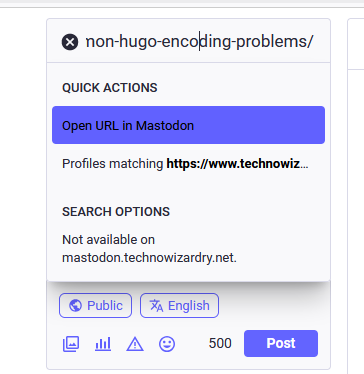
    A screenshot from Mastodon. The user is searching for a post url and is presented with Open URL or Profiles matching. Open URL is highlighted

    Right now, it’s passing back as HTML. Let’s generate something per post. Again, update the config.yaml to generate this new file.

     1
     2
     3
     4
     5
     6
     7
     8
     9
    10
    11
    12
    13
    
    outputFormats:
      ACTIVITY_USER:
        mediaType: application/activity+jsonindex
        notAlternative: true
        baseName: activitypub
      POST_JSON:
        mediaType: application/activity+json
        notAlternative: true
    
    outputs:
      page:
        - HTML
        - POST_JSON
    

    Let’s refactor this and the outbox and create a new partial that is shared between the outbox and post. The partial has to have the extension .html because that’s how Hugo works.

    layouts/partials/post_main_blob.html:

    1
    2
    3
    4
    5
    6
    7
    8
    
    "id": "{{ .Permalink }}",
    "type": "Article",
    "content": {{ .Content | htmlUnescape | jsonify (dict "noHTMLEscape" true) }},
    "url": {{ .Permalink | jsonify }},
    "summary": {{ printf "%s<br><br>%s" .Title .Summary | jsonify }},
    "attributedTo": "{{ $.Site.BaseURL }}author/adam",
    "to": "https://www.w3.org/ns/activitystreams#Public",
    "published": {{ dateFormat "2006-01-02T15:04:05-07:00" .Date | jsonify }}
    

    layouts/posts/single.post_json.ajson:

     1
     2
     3
     4
     5
     6
     7
     8
     9
    10
    11
    12
    13
    14
    15
    16
    17
    18
    19
    20
    21
    22
    23
    24
    25
    26
    27
    
    {
      "@context": [
       "https://www.w3.org/ns/activitystreams",
        {
          "ostatus": "http://ostatus.org#",
          "conversation": "ostatus:conversation",
          "sensitive": "as:sensitive"
        }
      ],
      {{ partial "post_main_blob" . }},
      "cc": [
        "{{ $.Site.BaseURL }}author/adam/followers"
      ],
      "sensitive": false,
      "attachment": [],
      "tag": [],
      "replies": {
        "id": {{ printf "%sreplies" .Permalink | jsonify }},
        "type": "Collection",
        "first": {
          "type": "CollectionPage",
          "next": {{ printf "%sreplies-page" .Permalink | jsonify }},
          "partOf": {{ printf "%sreplies" .Permalink | jsonify }},
          "items": []
        }
      }
    }
    

    Making the Accept header work

    This is the part where your environment may look different than mine and may differ. For example, if you’re running on Vercel, then this approach would be better. If you were using Azure Websites, then this also works. Both of these generate static files that include references to small functions as a service to handle the inbox and followers lists. These can be hosted on any cloud provider.

    Prior to this project, I used pure Hugo to generate static content and Mastodon was able to work with this to load posts. I built everything using a Hugo Docker image and packaged the content into an NGINX Docker container that was run on my Kubernetes cluster. However, this is not enough to implement ActivityPub.

    First, we need to check the Accept header to see if the client is requesting HTML or if it’s requesting an ActivityPub JSON blob of the item.

    Attempt 1 - Using NGINX

    My first attempt was to implement this using NGINX’s configuration and it looked like the below. The following implemented a conditional based on the Accept header and returned the index.ajson file if the client passed in the special MIME type or returns index.html in any other case.

     1
     2
     3
     4
     5
     6
     7
     8
     9
    10
    11
    12
    13
    14
    15
    16
    17
    18
    19
    20
    21
    22
    23
    24
    25
    26
    27
    28
    29
    30
    31
    32
    33
    34
    35
    36
    
    map $http_accept $ap_suffix {
      default   "/index.html";
      "~*application\/activity\+json"  "/index.ajson";
    }
    
    server {
        listen       80;
        server_name  localhost;
        root   /usr/share/nginx/html;
    
        types {
            application/activity+json ajson;
            text/html html;
            text/css  css;
            video/mp4 mp4;
            image/png png;
        }
    
        location / {
            try_files $uri $uri$ap_suffix =404;
        }
    
        location = /.well-known/webfinger {
            default_type application/jrd+json;
            try_files $uri/index.ajson =404;
        }
    
        location = /activitypub/outbox {
            try_files $uri$ap_suffix =404;
        }
    
        location = /activitypub/following {
            # $ap_suffix is either '.html' or '.ajson'
            try_files $uri$ap_suffix =404;
        }
    }
    

    This worked okay, but as I continued to implement this, I started to have issues. For example, when developing I had circular dependencies, and logic to implement request handling was getting split up into different Docker containers.

    Next part of this series, I’ll show how I approached this and implemented a server-side follower store.

    Conclusion

    As you can see, this is one of the lengthier posts, for a seemingly “easy” function. This goes to show you that the simplist of tasks can take the most amount of time. But don’t worry, all you have to do as a user is to “like” and “subscribe” and donate to my coffee fund for more information like this.

    To implement ActivityPub, we have to generate the webfinger file to allow clients to know where to go, an ActivityPub user page, an outbox to download all posts, and individual post files.

    References

    Copyright - All Rights Reserved

    Comments

    To give feedback, send an email to adam [at] this website url.

    Other Posts in Series

    This post is part of the ActivityPub on Hugo series. You can check out the other posts for more information:

      Donate

      If you've found these posts helpful and would like to support this work directly, your contribution would be appreciated and enable me to dedicate more time to creating future posts. Thank you for joining me!

      Donate to my blog